Best Tinnitus App: Six Checks Before You Pick One
Looking for the best tinnitus app? Use six simple checks to find a sound app that fits your ears, your nights and your phone, and try it tonight.
By Synra Editorial Team · Updated · 5 min read
You open the app store and type "tinnitus". Dozens of icons look back at you, and every one promises calm. Which one do you trust?
The best tinnitus app is the one that is easy for you to use, has sounds you like, lets you keep the volume low, and fades out as you fall asleep. No single app suits everyone. These six checks help you choose one in a few minutes.
Tinnitus masker
Sound is made on your device. Nothing to install.
Start quiet. Raise the level until the ringing just starts to blend in (the “mixing point”), not until it disappears. Keep the volume comfortable, especially with headphones.
Why does the "best" app depend on you?
Tinnitus is different in every ear. Some people hear a hiss, others a whistle or a hum. Some struggle at night, others during a quiet afternoon.
A survey in JMIR mHealth asked people with tinnitus about the apps they use. The authors concluded that the choice of the best app should be guided by each person's needs and preferences. They also found that sound was the main focus of 70% of the apps people named.
So the question is not which app wins a list. It is which one fits your ears and your evenings.
What do people look for in a tinnitus app?
In that same survey, people were asked what matters when they pick an app. Ease of use came first by a long way.
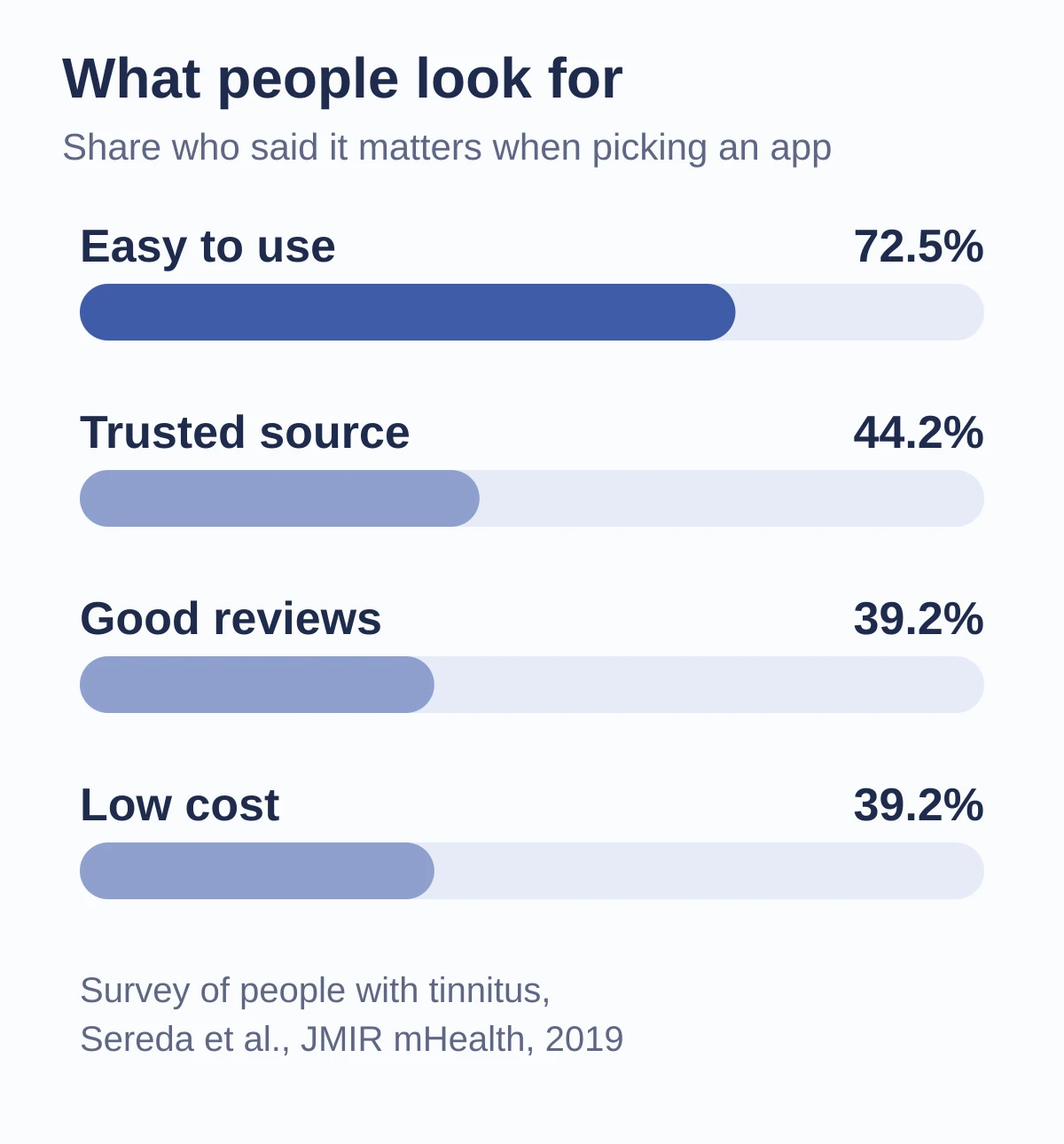
That fits real life. If the buttons are small or the menus are crowded, you will not open it at 2 a.m. A good app should feel calm from the first screen.
Which six checks should you use?
Run any app through this list. It takes five minutes.
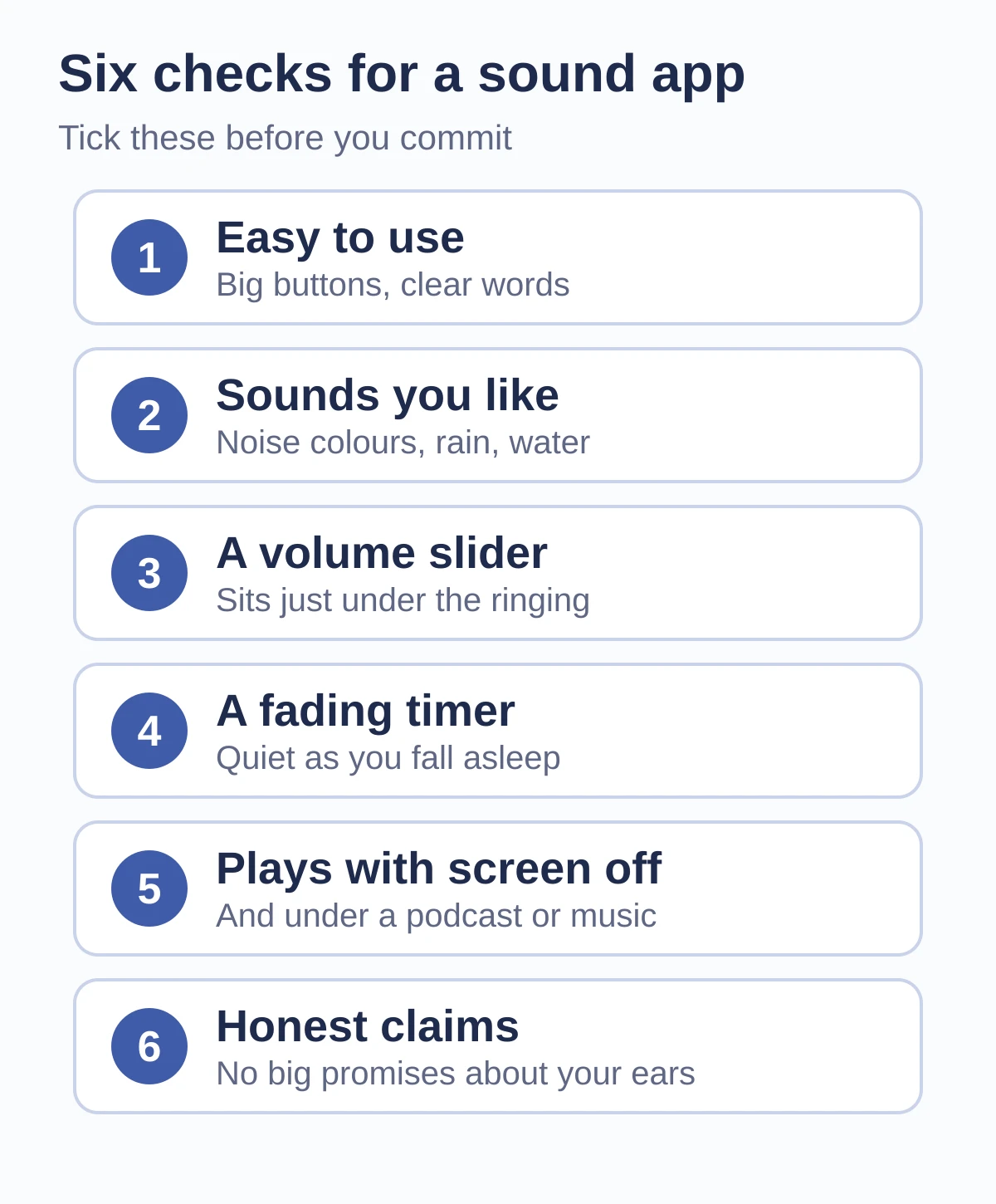
- Easy to use. You should find play, volume and timer without hunting.
- Sounds you like. Look for a few kinds, such as white, pink and brown noise, plus rain or flowing water. Tinnitus UK says many people find nature sounds helpful.
- A volume slider. Tinnitus UK says sound works best a little quieter than your tinnitus. You need fine control to get there.
- A fading timer. A pleasant sound can help you drift off, says Tinnitus UK. A timer lets it fade so you are not lying awake with a glowing phone.
- Plays with the screen off. Your phone can stay dark on the bedside table. Playing quietly under a podcast or music is a bonus.
- Honest claims. An app can offer sound, relaxation and ideas. Be wary of any app that makes big promises about your ears.
What kinds of app are there?
Most apps fall into a few groups. Many do a bit of each.
| App type | Good for | Check |
|---|---|---|
| Sound player | Filling a quiet room | Sounds you enjoy |
| Sleep sounds | Falling asleep | Fading timer, low volume |
| Relaxation programme | Calming the mind | Needs daily time |
| Hearing aid app | Streaming to your aids | Works with your aids |
The survey above found that many of the most-cited apps were built for other needs, such as sleep and relaxation, and that people often turned to them for sleep problems or to mask tinnitus. That is fine. A sleep sound can be a good tinnitus sound.
The NHS also notes that digital CBT, a talking programme that helps you handle worry about tinnitus, can be delivered by an online programme or app. It sits well beside a sound app. Soft sound for the room, a programme for the mind.
Can you test sounds before you download anything?
Yes. The player above offers brown, pink and white noise. Play each one very softly and notice which feels easiest. Our online tinnitus masker works in your browser with nothing to install.
If you are unsure which sound suits your ringing, start with what tinnitus can sound like. For more on how sound eases the ringing, read about tinnitus masking.
How loud should the app be?
Quieter than you expect. Tinnitus UK says habituation is best helped by sound a little quieter than your tinnitus most of the time. It adds that loud masking can make tinnitus seem louder when the sound stops.
A simple way to find your level:
- Start playback with the volume nearly silent.
- Turn it up slowly until you can hear both the sound and the ringing.
- If the ringing vanishes completely, step the volume down a little.
Is an app good for sleep?
For many people, yes. The American Tinnitus Association explains that the brain can only focus on one thing at a time, so a pleasant sound can give relief. Tinnitus UK says a relaxing sound at night can help if you struggle to fall asleep, and a low one can distract you if you wake early.
Phone on the bedside table, volume low, timer set: that is the whole routine. Our guide to sleeping with tinnitus covers the rest of the evening.
How Synra can help you choose
Synra was made with these six checks in mind. The Tinnitus Relief collection has brown, pink, green and white noise with rain and flowing-water sounds, so there is something kind for most ears. A soundscape loudness slider helps you tuck the sound just under the ringing, and frequency intensity (Off, Low, Normal or High) shifts it softer or brighter. A playback timer from 10 to 60 minutes fades out as you drift off and keeps playing with the screen off, while Backdrop Mode lets it play under a podcast or music. There are also 8D audio, binaural beats and 432 and 528 Hz sessions to explore. You end up with a quieter room and a ringing that stands out less. The free 1-minute tinnitus quiz points you to sounds worth trying first. Why not take it tonight?
When to see a doctor
See your doctor if you notice any of these:
- a pulse-like beat in time with your heart (the NHS advises an urgent GP appointment)
- sudden tinnitus, or sudden hearing loss
- ringing in one ear only
- dizziness, ear pain or discharge
- ringing that keeps getting worse
- low mood, poor sleep or trouble focusing because of the noise
An app is a helper, not a check-up. A soft sound can make the wait easier.
A simple plan for tonight
- Press play on the player above and pick one sound your ears accept.
- Run the app you are considering through the six checks.
- Keep the volume just under the ringing.
- Set a 30-minute fading timer and put the phone down.
- Tomorrow, note how the night felt and whether to keep the app.
More reading is in our full set of tinnitus guides.
Common questions
What is the best app for tinnitus?
There is no single best one. A survey of people with tinnitus in JMIR mHealth concluded that the best app should be guided by each person's needs and preferences. Ease of use was the most common thing people said they looked for, so start with an app that feels simple to you.
Are tinnitus apps free?
Many are. Tinnitus UK says there are many phone apps offering relaxing, natural or nature sounds, and that sound therapy can be free or inexpensive. Some apps charge for extra sounds or features, so check what is included before you rely on one.
Can an app help me sleep with tinnitus?
Many people find it helps. Tinnitus UK says a pleasant, relaxing sound can help when you struggle to fall asleep, and a quiet one can distract you if you wake in the night. A timer that fades out saves you from fiddling with your phone in the dark.
Should I use an app or a sound machine?
Both work as sound enrichment. A bedside sound generator is simple and has its own volume dial. An app is already in your pocket, often costs less and offers more sounds. Choose the one you will actually use every day.
How loud should a tinnitus app be?
Tinnitus UK suggests a sound a little quieter than your tinnitus for most of the day. Start very soft and raise it only until the sound and the ringing blend together.
More tinnitus guides
Find what helps your tinnitus: free 1-minute quiz.
Free tinnitus quiz →Tinnitus quiz →